Trevor PaughSystems engineer
Trevor PaughProject Chronicles

Chronicles / Eboda Gymnast

Active · Oct 2026 to present

Eboda Gymnast

A personal Windows replacement for Adobe Acrobat: read, fill forms, edit page text in place, sign, and rearrange pages. No cloud, no telemetry, no subscription.

27 entries Stack Tauri 2 · Rust · PDFium · HTML UI · Windows installer View on timeline

Eboda Gymnast is a desktop PDF editor the owner is building for their own use, with the long-term ambition of matching Acrobat feature for feature. Version one does three things: read (scroll, zoom, print), edit (fill forms and change the text on a page in place), and sign (place a saved signature). It installs as the default handler for PDFs, works entirely on the local disk, and saves through a temporary file that is validated before it replaces the original.

The stack was chosen for portability and licence freedom: a Tauri 2 shell with a Rust core on the PDFium engine and an HTML interface that copies Acrobat's chrome. In-place text editing is custom work, since no free library does it. Planned in one evening with seven phases and a single mockup round; the reader landed on day one, in-place text editing and form filling on day two, and signatures, page organising, print, and font fetching overnight into day three, when the installer went to review. Version one closed on 10 October, and two slices followed the same evening at the owner's request: editing text inside flattened forms, and overriding read-only form fields after asking. On 12 October the owner picked three more slices at once, and parallel builders delivered certified-document rules, a Comment tab, text recognition with a Find bar, and password-protected files, with the project switching to American English along the way. On 13 October the owner asked what paid Acrobat features were left; the manager ranked eight that work entirely on the local disk and the owner ordered them in batches. Overnight into 14 October, parallel builders delivered protection on save, headers and footers with Bates numbers and watermarks, export and create, a side-by-side compare, and real certificate signing, and then compression and redaction, the last after four rounds of review. Everything ordered from the list is on main, and under the owner's standing authorization the manager added the last roadmap item, batch actions over a folder. A new build goes to the owner next. On 15 October the deferred review follow-ups were dispatched in parallel along with a parked idea, filling a form from saved answers, and the first quality sweep of a build the owner had used; the signing branch alone went through four rounds of review, which found and closed six ways to forge a change past the checker. By the evening of 15 October every follow-up was merged and a fresh build was with the owner.
Latest developments

Milestone

Fill from saved answers

One button in Fill & Sign fills every empty field from the answers the app has already learned, matching by the field's full name first and its label second, and skipping dates, passwords, locked and read-only fields. Each fill is a single undo step and nothing touches the file until Save. Parked on 8 October as a later version, it was pulled forward by the owner's standing order to keep moving without them, and took three review rounds to merge.

Decision

Six holes in the change checker

The checker that says whether a signed or certified PDF has been changed since signing was reviewed as an attacker would review it. Two rounds found five ways a forged change could pass as untouched; the fix round found a sixth. Every one was closed with the reviewer's own attack tests landed, and none was written down as a known limit. The same day a redaction review found a font measurement that could let a letter survive inside a repeating pattern, and that path now refuses rather than guesses.

Progress

Follow-ups, a sweep, and two branches still in review

With the roadmap delivered, the project turned to the review follow-ups it had been deferring and to its first quality sweep of a real build: six bugs and nine observations from one evening of use, fixed in a single branch. Two follow-up branches, for signing and for scanning, are still in review; the signing one found that a certified document could be quietly changed after the fact, and closed every path the reviewer could find.

Milestone

The follow-ups build

The review follow-ups batch is merged and a fresh build is with the owner. Five branches went in: editing fixes, fill from saved answers, the first quality sweep, the scanning follow-ups for compare, redact, compress, text recognition, and batch, and the signing follow-ups with the hardened change checker. Behind them sit a sweep of 136 checks on the previous build with every failure fixed, and seven review rounds across the two heaviest branches with every finding fixed and none recorded as a limit.

Milestone

Batch, over a folder

The last item on the roadmap is merged: Batch runs Compress, Protect, Export, Header and Footer, Watermark, or Recognize text over every PDF in a folder, writing results to a separate output folder and never into the source. Bates numbers continue across files. Four review rounds each found a way the output could leak back into the source folder, from a junction to a long-path prefix to one folder reached by two names, and every one was fixed. Built under the owner's standing authorization to keep improving without their input.

Milestone

Compare and sign

The second batch of the Acrobat list followed the first by about ninety minutes: Compare two PDFs, with a word-level diff and a pixel diff side by side under synced scrolling, and certificate signing, a real cryptographic signature from a self-signed or imported certificate, with a panel that reports Valid, Signed then changed, or Invalid. Both reviews approved on the first pass.

Milestone

Compress and redact, after four rounds

The third batch of the Acrobat list is on main: Compress, which writes a smaller copy under a new name, and Redaction with true content removal. Redaction took four review rounds. The first found four ways the text survived under the mark, the second two more, the third two cases where the app removed too much, and the fourth approved with two small fixes. The reviewer's checks stayed in the test suite. A new build from the merge goes to the owner next.

Milestone

Protect, stamp, export

The first batch of the Acrobat list landed overnight: password protection and permissions on save, headers and footers with page numbers, Bates numbers and text watermarks, and export of pages as images or text, image extraction, and a PDF built from images. Every branch needed one round of review changes, and one review found a colour bug that had been on main since the print slice. A new build went to the owner before two in the morning.

Decision

Redaction fails its first review

True redaction, where the text under the black box is gone from the file and not just covered, failed its first review. An adversarial reviewer wrote two dozen independent checks on the output and found four ways a copy marked as verified still held the text: inside repeating fill patterns, through an exemption for text that also appears elsewhere on the page, in documents embedded more than one level deep, and in glyphs drawn as outlines that cross the mark. The manager took the conservative fix for each. Where removal cannot be proven, the app refuses to write the copy.

Decision

The Acrobat list

The owner asked which of Acrobat's paid features the app could still add. The manager compared the app against the published feature list and ranked eight that can be done entirely on the local disk. The owner ordered the first three in parallel, then the next two, with redaction and compression fitted in wherever they would go.

Design

American English

The project switches to American English everywhere: interface text, documentation, code comments, identifiers, and commit messages. The builders had defaulted to British spellings, and the owner noticed. A sweep of about a hundred hits followed the morning's merges, and new work follows the rule from now on.

Decision

Are the peers worth it?

The owner asked whether the two standing peer sessions, a builder and a reviewer, were earning their keep. The manager's answer was no: both were down when the day's five branches were dispatched, one-off agents in their own working copies did the work without losing anything, and the memory the peers were supposed to provide lives in the briefs and the manager's files anyway. The recommendation is to drop them. The owner's answer is pending.

Milestone

Comments

The Comment tab is in: select and copy text, highlight, underline, and strike through, sticky notes, ink, free-text boxes, and moving or recoloring any of them. Every change is written as an incremental update and read back before it counts. Review caught two things: right-to-left text was being underlined along its top edge, and the branch had grown its own certification rule that disagreed with the shared one.

Milestone

Password protected

PDFs that need a password now ask for one in the app, open in both rendering engines, and save still encrypted. The branch was done a day before it merged: the sandbox had refused the builder's push and the manager does not route around a refusal, so it waited for the owner. Merging the day's other work into it exposed two new read-backs that had forgotten the password. Five generated sample files were added so the owner can retest without hunting for real ones.

Decision

The OS does the reading

Text recognition uses the engine built into Windows rather than Tesseract or a Rust-native model. No toolchain, no download, no bundled binaries, and it follows the project's habit of leaning on the operating system where the app only runs on Windows anyway. The review found that a malformed scan could shift the whole invisible text layer by hundreds of points, and the fix checks where the first recognized word actually lands before a save counts.

Milestone

Three at once

With version one and its two follow-ups retested and passing, the owner asked what was left and picked three items in one go: the parked review fixes, a Comment tab, and text recognition with a Find bar. Five builders went out in parallel, each in its own working copy with its own reviewer. By mid-afternoon four of the five branches were on main and a fresh installer was in the owner's hands.

Milestone

An installer, and a sandbox that hid it

The last of the six verbs is built and in review: a per-user Windows setup that needs no administrator prompt, registers Eboda Gymnast under Open with for PDFs without touching the default, and keeps one window. Two decisions: the registration is written by the installer's own hooks so uninstall removes only its own keys, and there is no code signing for a personal tool. Both install tests ran inside a desktop app's package sandbox, which swallowed the registry writes, so the real-profile check is on the owner's retest list.

Milestone

Editing text that was flattened

The first slice past version one. Edit mode now reaches text drawn inside nested forms, which is where the app's own Flatten puts every filled field value, two levels deep. Asked for the evening the roadmap closed, built in one evening, one review round, merged. Two decisions: a nested form is editable only when it is drawn exactly once in the file, and encrypted files opened without a password are editable when their permissions allow it.

Milestone

Fetching the missing font

When a PDF uses a font the machine lacks, the text editor now offers a one-click download of a free exact or metric-compatible face, Carlito for Calibri and the like, from Google Fonts, after a consent dialog that shows the licence, the size, and the addresses. Thirteen open-licensed families. The download table is generated from one pinned revision of the font repository with sizes and hashes checked in, so the app talks to one host over https only and verifies everything it fetches. It is the app's first and only network call.

Milestone

Organising pages

A Pages tab with a thumbnail grid: drag to reorder, rotate, delete with an undo toast, insert from another file, extract, split, and combine. Moves, rotations, and inserts are appended to the file as incremental sections; deletes, extracts, and splits rewrite the file whole at save time. Verified overnight in the real executable and approved with only optional findings. The fourth of the six version-one verbs, shipped unattended.

Milestone

Print

Ctrl+P or Menu, Print opens the app's own options dialog, with page ranges, fit or actual size, and auto-rotate, and then the Windows print dialog. Pages are rastered by the rendering engine at the printer's resolution and sent through the Windows graphics layer, all behind the platform module so the Rust core stays free of Windows APIs. Verified overnight in the real executable through Print to PDF. Review asked for one fix: the shortcut pressed inside the app's own dialogs let the embedded browser print its window instead.

Milestone

Sign here

The third verb is done. Draw, type, or upload a signature or initials, place it on any page as a movable stamp, resize it, undo it, then save it either still movable or burnt into the page. Up to five signatures and five initials are kept encrypted per Windows user for reuse. Signatures are stored as standard stamp annotations so other readers show them. Files whose permissions forbid annotations are refused with a plain message. A brand mark, a gymnast in a split leap above the beam, landed the same night.

Decision

Why editing never worked

Text editing had never worked in the real application across three merged slices. The Rust side sent the edited page text under one field name, the interface read another, and the error was swallowed. Every mocked test and every Rust unit test had been green the whole time. A first fix was built on the wrong diagnosis. The second fixes the field, hardens the interface, and adds a rule: every slice that touches a command between the shell and the core is smoke-tested in the real executable, not only with mocks.

Milestone

Editing text in place

The second of the three verbs is done. Click a run of text, retype it, pick a replacement font if the document's is not installed, undo and redo, and save. A save writes a temporary file beside the original, reopens and re-renders it to check, then swaps it in; it refuses if another program changed the file meanwhile. The writer is the builder's own, so every byte outside the edited text stays as it was. Two review rounds found a validation check that only counted objects and a close shortcut that skipped the unsaved-changes guard.

Milestone

Finding the font first

The first half of in-place text editing merged: a model of the text on each page, selection of it in Edit mode, and matching the document's fonts against the fonts installed on the machine. Nothing is written into a PDF yet; that is the second half, now in progress. Review caught fonts without a typographic family name being reported as missing when they were installed. One rule was confirmed: a font's embedding rights are enforced in the save path, not only in the interface.

Milestone

Forms you can fill

Eboda Gymnast fills PDF forms: text, checkboxes, radio buttons, dropdowns, and lists, including the encrypted government forms that refuse most free tools. Only the changed objects are appended on save, and a prompt offers Keep editable or Flatten. Answers are learnt on save and stored encrypted, with a filter that never remembers social security, account, card, or ID numbers. Review caught that the first Flatten still left every typed answer recoverable in the file; it is now a full rewrite with a test that scans for remnants. Signatures are next.

Milestone

My own Acrobat

A new project, planned and started in one day. The owner wants a personal Windows replacement for Adobe Acrobat: read, fill forms, edit text on the page, sign, rearrange pages, with full feature parity as the long ambition. Seven phases were planned, one mockup round was accepted without notes, the repository was created, and the first slice, a desktop shell with a PDF reader, was built, reviewed, and merged before the day ended. The stack was chosen for portability and licence freedom.

The story, from the beginning

My own Acrobat

A new project, planned and started in one day. The owner wants a personal Windows replacement for Adobe Acrobat: read, fill forms, edit text on the page, sign, rearrange pages, with full feature parity as the long ambition. Seven phases were planned, one mockup round was accepted without notes, the repository was created, and the first slice, a desktop shell with a PDF reader, was built, reviewed, and merged before the day ended. The stack was chosen for portability and licence freedom.

Read the entry
I'd like to make my own personal version of Adobe Acrobat. Ideally, I want 1:1 feature parity.

Forms you can fill

Eboda Gymnast fills PDF forms: text, checkboxes, radio buttons, dropdowns, and lists, including the encrypted government forms that refuse most free tools. Only the changed objects are appended on save, and a prompt offers Keep editable or Flatten. Answers are learnt on save and stored encrypted, with a filter that never remembers social security, account, card, or ID numbers. Review caught that the first Flatten still left every typed answer recoverable in the file; it is now a full rewrite with a test that scans for remnants. Signatures are next.

Read the entry
Just keep working from here until you can't. Make minor decisions on your own.

Finding the font first

The first half of in-place text editing merged: a model of the text on each page, selection of it in Edit mode, and matching the document's fonts against the fonts installed on the machine. Nothing is written into a PDF yet; that is the second half, now in progress. Review caught fonts without a typographic family name being reported as missing when they were installed. One rule was confirmed: a font's embedding rights are enforced in the save path, not only in the interface.

Read the entry

Editing text in place

The second of the three verbs is done. Click a run of text, retype it, pick a replacement font if the document's is not installed, undo and redo, and save. A save writes a temporary file beside the original, reopens and re-renders it to check, then swaps it in; it refuses if another program changed the file meanwhile. The writer is the builder's own, so every byte outside the edited text stays as it was. Two review rounds found a validation check that only counted objects and a close shortcut that skipped the unsaved-changes guard.

Read the entry

Why editing never worked

Text editing had never worked in the real application across three merged slices. The Rust side sent the edited page text under one field name, the interface read another, and the error was swallowed. Every mocked test and every Rust unit test had been green the whole time. A first fix was built on the wrong diagnosis. The second fixes the field, hardens the interface, and adds a rule: every slice that touches a command between the shell and the core is smoke-tested in the real executable, not only with mocks.

Read the entry
If you want to drive and see the behavior yourself, be my guest.

Sign here

The third verb is done. Draw, type, or upload a signature or initials, place it on any page as a movable stamp, resize it, undo it, then save it either still movable or burnt into the page. Up to five signatures and five initials are kept encrypted per Windows user for reuse. Signatures are stored as standard stamp annotations so other readers show them. Files whose permissions forbid annotations are refused with a plain message. A brand mark, a gymnast in a split leap above the beam, landed the same night.

Read the entry
Read, edit and sign PDFs, at the very least.

Print

Ctrl+P or Menu, Print opens the app's own options dialog, with page ranges, fit or actual size, and auto-rotate, and then the Windows print dialog. Pages are rastered by the rendering engine at the printer's resolution and sent through the Windows graphics layer, all behind the platform module so the Rust core stays free of Windows APIs. Verified overnight in the real executable through Print to PDF. Review asked for one fix: the shortcut pressed inside the app's own dialogs let the embedded browser print its window instead.

Read the entry

Organising pages

A Pages tab with a thumbnail grid: drag to reorder, rotate, delete with an undo toast, insert from another file, extract, split, and combine. Moves, rotations, and inserts are appended to the file as incremental sections; deletes, extracts, and splits rewrite the file whole at save time. Verified overnight in the real executable and approved with only optional findings. The fourth of the six version-one verbs, shipped unattended.

Read the entry
Keep going.

Fetching the missing font

When a PDF uses a font the machine lacks, the text editor now offers a one-click download of a free exact or metric-compatible face, Carlito for Calibri and the like, from Google Fonts, after a consent dialog that shows the licence, the size, and the addresses. Thirteen open-licensed families. The download table is generated from one pinned revision of the font repository with sizes and hashes checked in, so the app talks to one host over https only and verifies everything it fetches. It is the app's first and only network call.

Read the entry

Editing text that was flattened

The first slice past version one. Edit mode now reaches text drawn inside nested forms, which is where the app's own Flatten puts every filled field value, two levels deep. Asked for the evening the roadmap closed, built in one evening, one review round, merged. Two decisions: a nested form is editable only when it is drawn exactly once in the file, and encrypted files opened without a password are editable when their permissions allow it.

Read the entry
It can't edit text that's been flattened. Can we make that a feature?

An installer, and a sandbox that hid it

The last of the six verbs is built and in review: a per-user Windows setup that needs no administrator prompt, registers Eboda Gymnast under Open with for PDFs without touching the default, and keeps one window. Two decisions: the registration is written by the installer's own hooks so uninstall removes only its own keys, and there is no code signing for a personal tool. Both install tests ran inside a desktop app's package sandbox, which swallowed the registry writes, so the real-profile check is on the owner's retest list.

Read the entry

Three at once

With version one and its two follow-ups retested and passing, the owner asked what was left and picked three items in one go: the parked review fixes, a Comment tab, and text recognition with a Find bar. Five builders went out in parallel, each in its own working copy with its own reviewer. By mid-afternoon four of the five branches were on main and a fresh installer was in the owner's hands.

Read the entry
Do items 1, 2, 5 now and in parallel, if possible.

The OS does the reading

Text recognition uses the engine built into Windows rather than Tesseract or a Rust-native model. No toolchain, no download, no bundled binaries, and it follows the project's habit of leaning on the operating system where the app only runs on Windows anyway. The review found that a malformed scan could shift the whole invisible text layer by hundreds of points, and the fix checks where the first recognized word actually lands before a save counts.

Read the entry

Password protected

PDFs that need a password now ask for one in the app, open in both rendering engines, and save still encrypted. The branch was done a day before it merged: the sandbox had refused the builder's push and the manager does not route around a refusal, so it waited for the owner. Merging the day's other work into it exposed two new read-backs that had forgotten the password. Five generated sample files were added so the owner can retest without hunting for real ones.

Read the entry
Pushed the password branch.

Comments

The Comment tab is in: select and copy text, highlight, underline, and strike through, sticky notes, ink, free-text boxes, and moving or recoloring any of them. Every change is written as an incremental update and read back before it counts. Review caught two things: right-to-left text was being underlined along its top edge, and the branch had grown its own certification rule that disagreed with the shared one.

Read the entry

Are the peers worth it?

The owner asked whether the two standing peer sessions, a builder and a reviewer, were earning their keep. The manager's answer was no: both were down when the day's five branches were dispatched, one-off agents in their own working copies did the work without losing anything, and the memory the peers were supposed to provide lives in the briefs and the manager's files anyway. The recommendation is to drop them. The owner's answer is pending.

Read the entry
Are we really getting any value out of persistent peers for this project?

American English

The project switches to American English everywhere: interface text, documentation, code comments, identifiers, and commit messages. The builders had defaulted to British spellings, and the owner noticed. A sweep of about a hundred hits followed the morning's merges, and new work follows the rule from now on.

Read the entry
FYI, we want to use American english. So, words like colour would be color.

The Acrobat list

The owner asked which of Acrobat's paid features the app could still add. The manager compared the app against the published feature list and ranked eight that can be done entirely on the local disk. The owner ordered the first three in parallel, then the next two, with redaction and compression fitted in wherever they would go.

Read the entry
Do 1, 2, 3 in parallel, then 4 and 5. Fit 6 and 7 in wherever you can.

Redaction fails its first review

True redaction, where the text under the black box is gone from the file and not just covered, failed its first review. An adversarial reviewer wrote two dozen independent checks on the output and found four ways a copy marked as verified still held the text: inside repeating fill patterns, through an exemption for text that also appears elsewhere on the page, in documents embedded more than one level deep, and in glyphs drawn as outlines that cross the mark. The manager took the conservative fix for each. Where removal cannot be proven, the app refuses to write the copy.

Read the entry
Fit 6 and 7 in wherever you can.

Protect, stamp, export

The first batch of the Acrobat list landed overnight: password protection and permissions on save, headers and footers with page numbers, Bates numbers and text watermarks, and export of pages as images or text, image extraction, and a PDF built from images. Every branch needed one round of review changes, and one review found a colour bug that had been on main since the print slice. A new build went to the owner before two in the morning.

Read the entry

Compress and redact, after four rounds

The third batch of the Acrobat list is on main: Compress, which writes a smaller copy under a new name, and Redaction with true content removal. Redaction took four review rounds. The first found four ways the text survived under the mark, the second two more, the third two cases where the app removed too much, and the fourth approved with two small fixes. The reviewer's checks stayed in the test suite. A new build from the merge goes to the owner next.

Read the entry
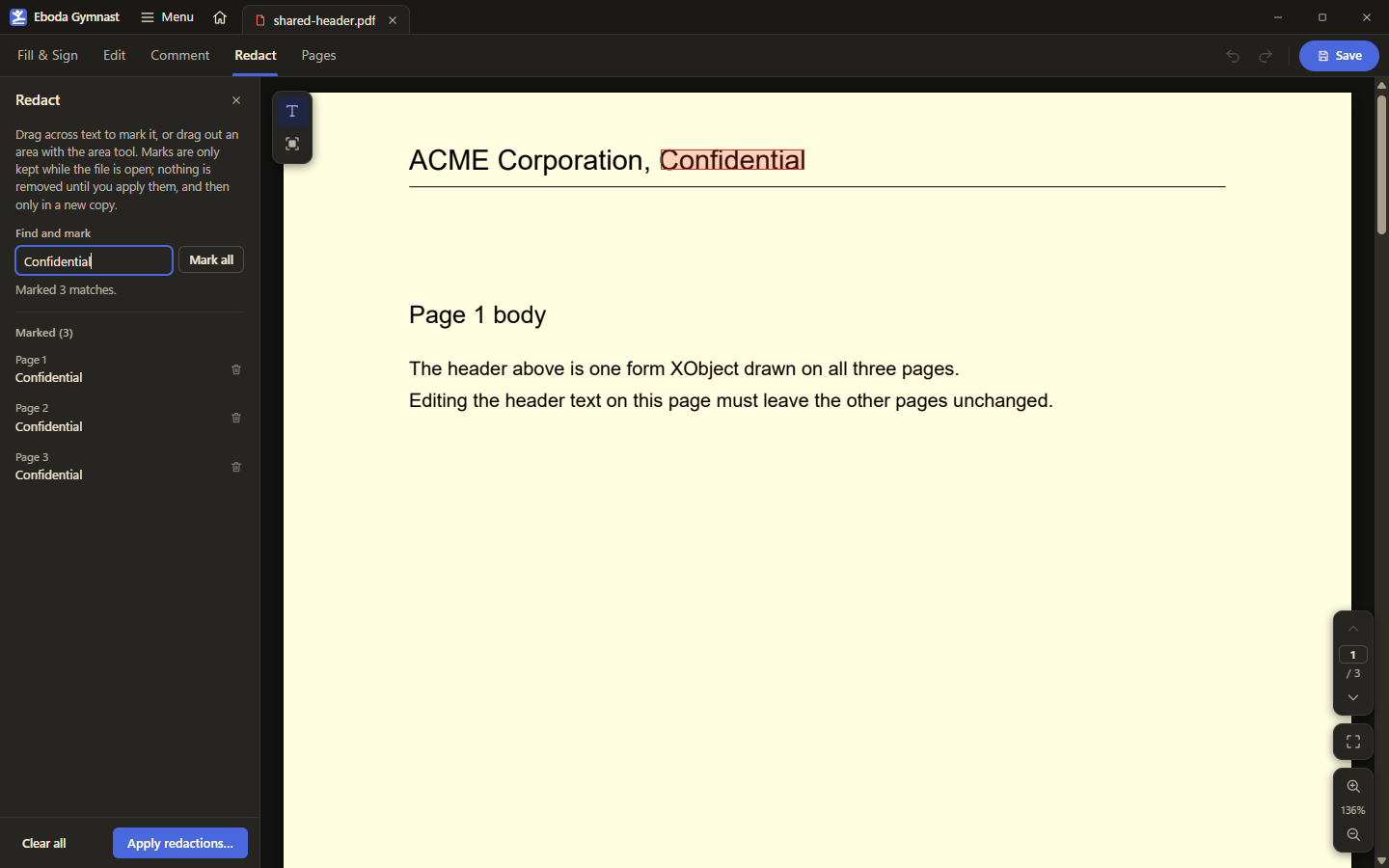
The Redact tool: a find box marks every match across the document, and nothing is removed until the marks are applied to a new copy.

Compare and sign

The second batch of the Acrobat list followed the first by about ninety minutes: Compare two PDFs, with a word-level diff and a pixel diff side by side under synced scrolling, and certificate signing, a real cryptographic signature from a self-signed or imported certificate, with a panel that reports Valid, Signed then changed, or Invalid. Both reviews approved on the first pass.

Read the entry

Batch, over a folder

The last item on the roadmap is merged: Batch runs Compress, Protect, Export, Header and Footer, Watermark, or Recognize text over every PDF in a folder, writing results to a separate output folder and never into the source. Bates numbers continue across files. Four review rounds each found a way the output could leak back into the source folder, from a junction to a long-path prefix to one folder reached by two names, and every one was fixed. Built under the owner's standing authorization to keep improving without their input.

Read the entry
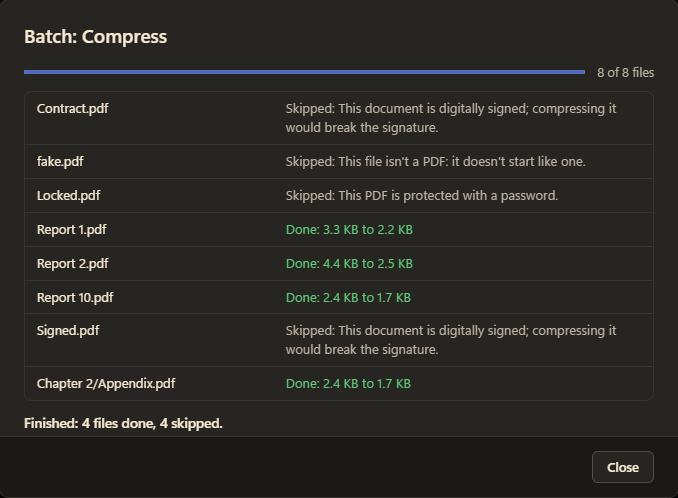
The end of a Compress batch: signed, locked, and non-PDF files skipped with their reasons, the rest done with sizes before and after, a file from a subfolder last.

The follow-ups build

The review follow-ups batch is merged and a fresh build is with the owner. Five branches went in: editing fixes, fill from saved answers, the first quality sweep, the scanning follow-ups for compare, redact, compress, text recognition, and batch, and the signing follow-ups with the hardened change checker. Behind them sit a sweep of 136 checks on the previous build with every failure fixed, and seven review rounds across the two heaviest branches with every finding fixed and none recorded as a limit.

Read the entry
Once you have a fresh build that I can test, wrap up your work and summarize everything that was done since I last tested.
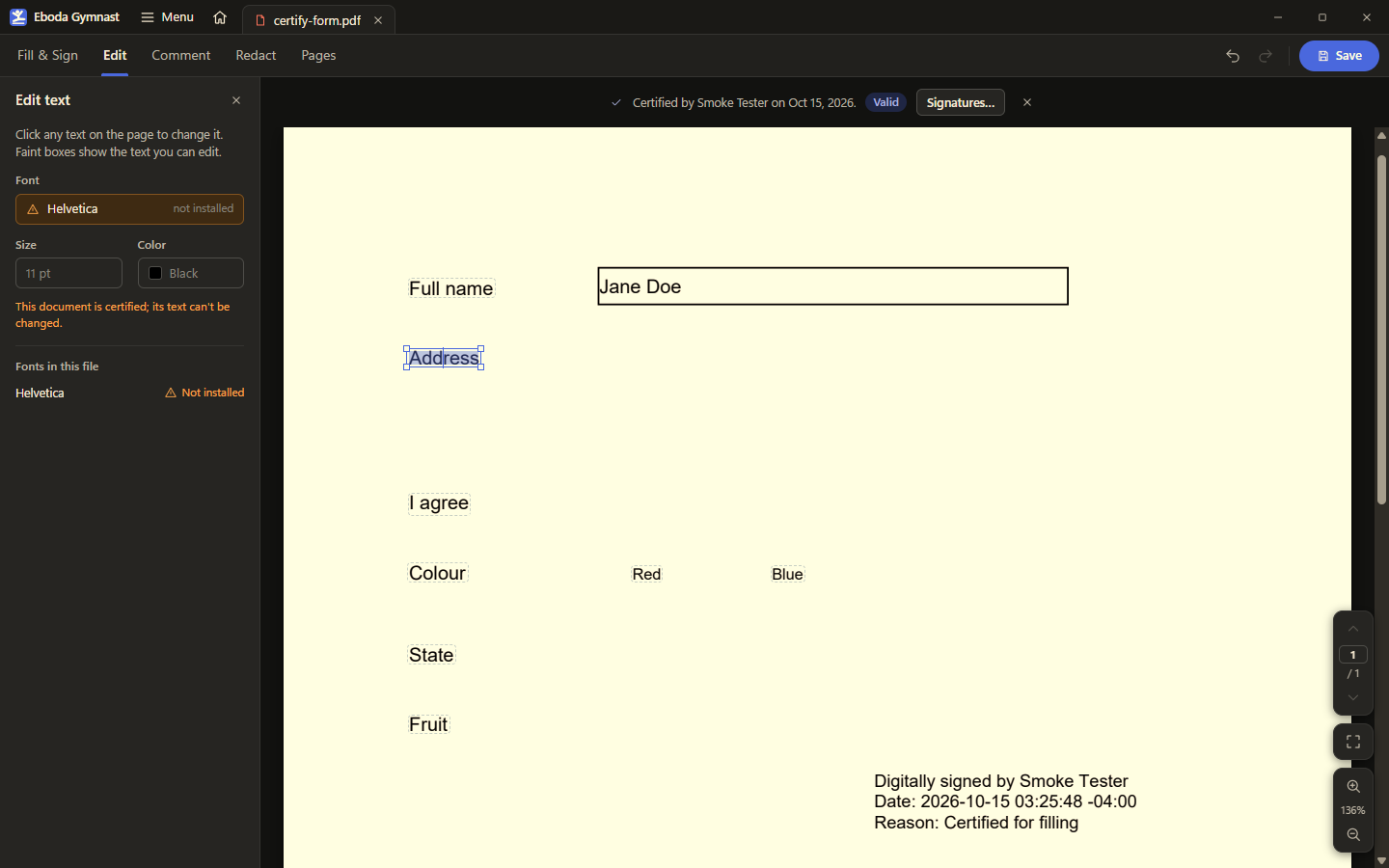
The Edit tab on a certified form: the text can be selected but not changed, and the panel says why. Filling the fields is still allowed, because that is what the certification permits. The name in the form is a test fixture.

Follow-ups, a sweep, and two branches still in review

With the roadmap delivered, the project turned to the review follow-ups it had been deferring and to its first quality sweep of a real build: six bugs and nine observations from one evening of use, fixed in a single branch. Two follow-up branches, for signing and for scanning, are still in review; the signing one found that a certified document could be quietly changed after the fact, and closed every path the reviewer could find.

Read the entry
I want dev to move faster.

Six holes in the change checker

The checker that says whether a signed or certified PDF has been changed since signing was reviewed as an attacker would review it. Two rounds found five ways a forged change could pass as untouched; the fix round found a sixth. Every one was closed with the reviewer's own attack tests landed, and none was written down as a known limit. The same day a redaction review found a font measurement that could let a letter survive inside a repeating pattern, and that path now refuses rather than guesses.

Read the entry
Anything else you can improve on or complete: you have my authorization to do so.
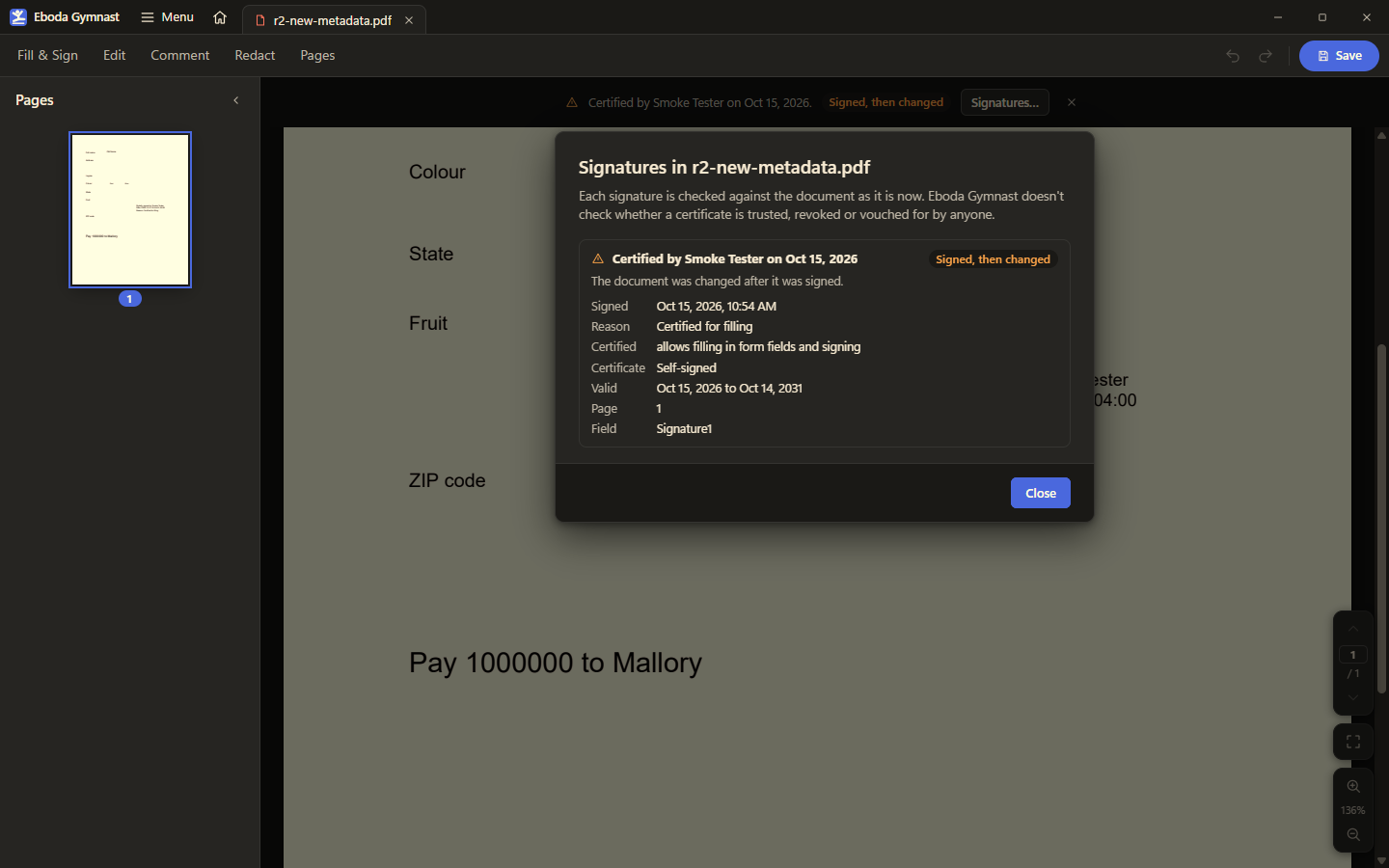
The Signatures panel on a test document a reviewer had altered after certification: the badge reads 'Signed, then changed' where an earlier build would have said 'Valid'. The signer and the page text are test fixtures.

Fill from saved answers

One button in Fill & Sign fills every empty field from the answers the app has already learned, matching by the field's full name first and its label second, and skipping dates, passwords, locked and read-only fields. Each fill is a single undo step and nothing touches the file until Save. Parked on 8 October as a later version, it was pulled forward by the owner's standing order to keep moving without them, and took three review rounds to merge.

Read the entry
Go ahead with the review follow-ups; keep working without my input.
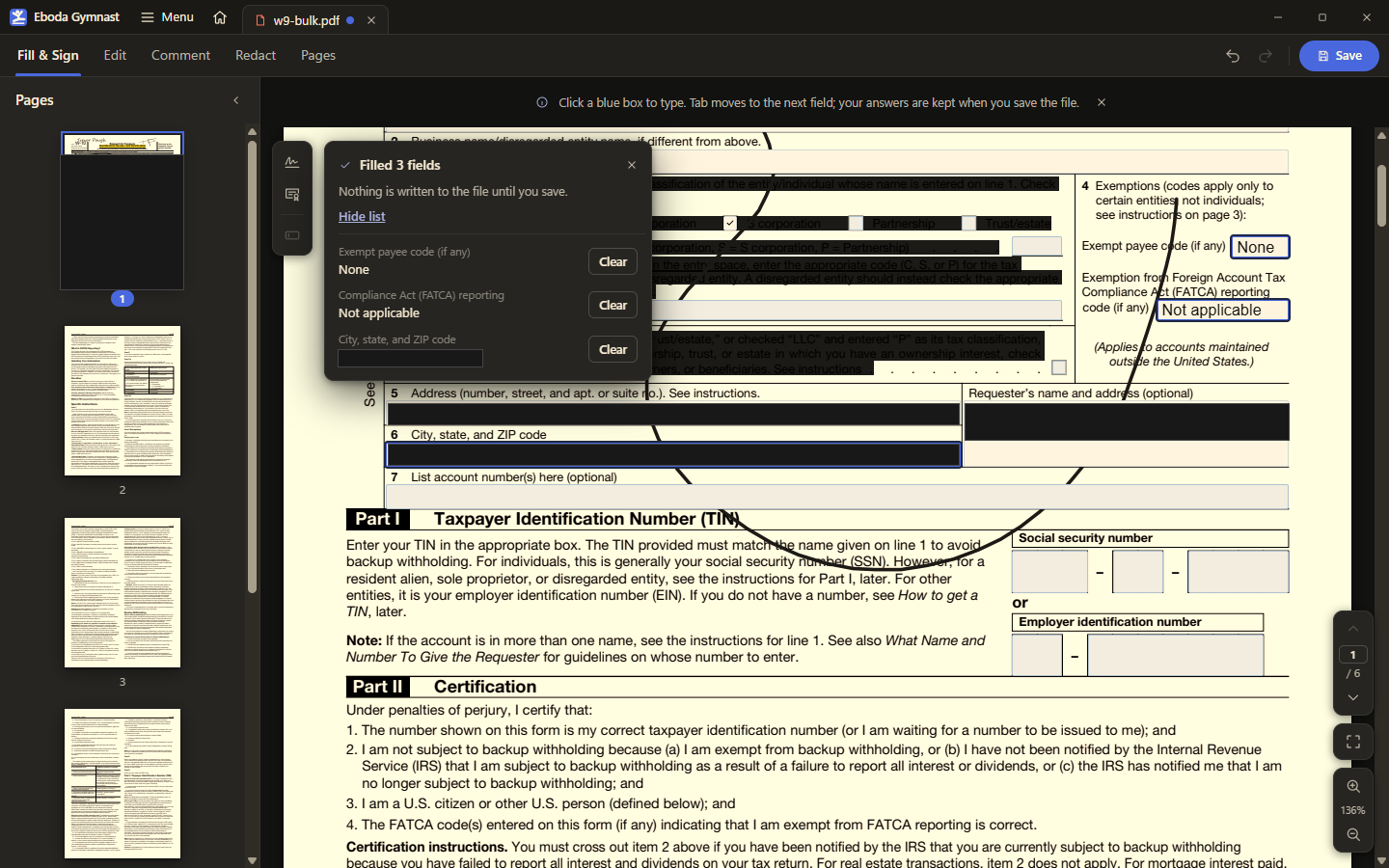
Fill & Sign after one press of the button: three fields filled from saved answers, each with its own Clear, and a note that nothing is written until the file is saved. The sample form's addresses are boxed out.