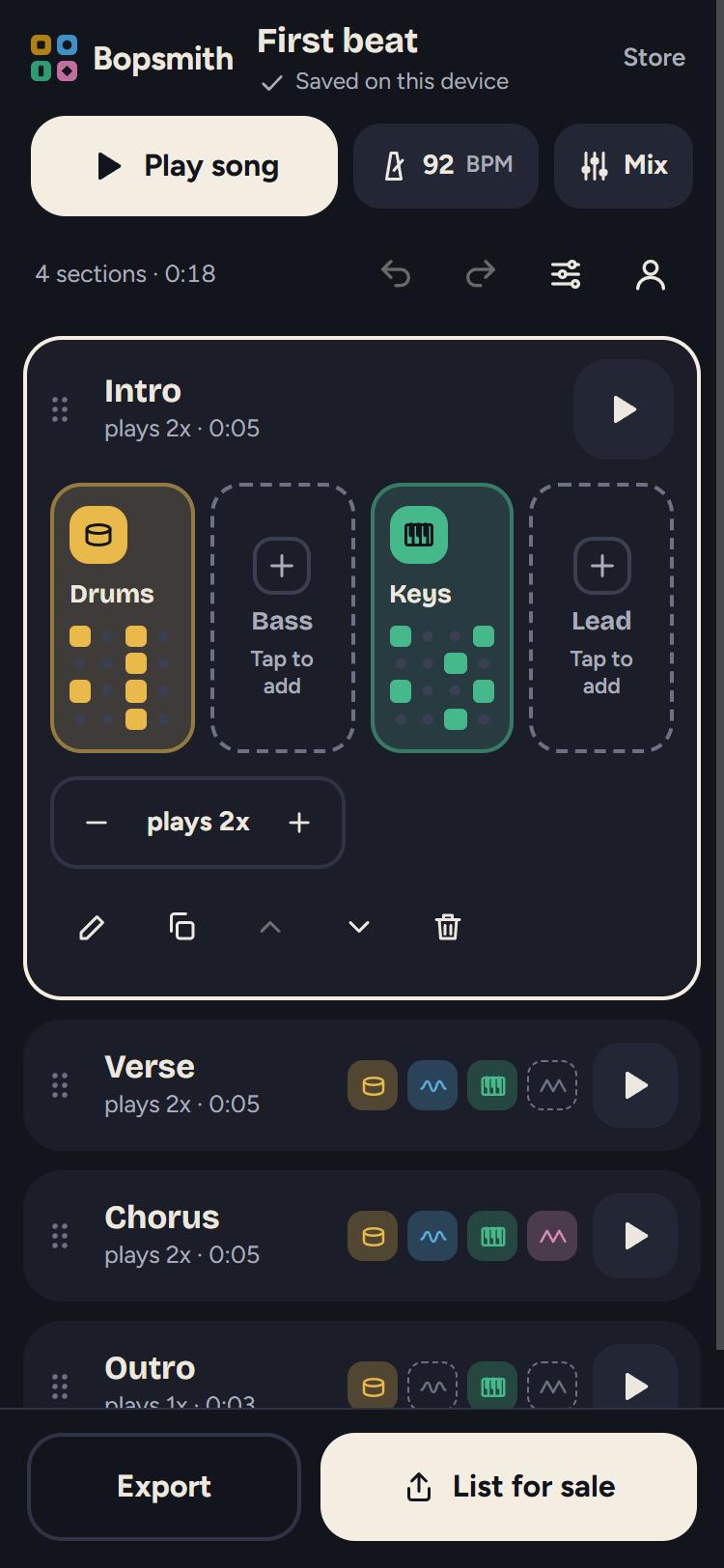
Version one shipped with the round-one mockups’ palette but not their look. The type was the system font, every corner had the same twelve-pixel radius, the proportions were the builder’s own, and the transport sat at the bottom of the screen. When the owner asked why the editor did not look like mockup 01, the cause was in the process rather than the code: the build briefs had treated the mockups as intent, and no one had ever put a screenshot of the app next to the mockup.
Mockups as the spec
The fix was a slice of its own with a different rule. For the song screen and the pattern screen, the two editor mockups were the specification, and the review would be done from side-by-side screenshots at phone and desktop widths, with every remaining difference written down.
- Type. Headings in Bricolage Grotesque and body text in Figtree, both under the SIL Open Font License, self-hosted in Latin and Latin-extended subsets so Spanish keeps its accents. The service worker precaches them, so the installed app still looks right offline; that was checked by loading the app, killing the server, and reloading.
- Shape. The mockup’s sixteen-to-twenty-pixel radii, larger tap targets, and section rows as cards. The open section shows four tall instrument cells with a preview of each pattern, and empty cells are dashed with “Tap to add”.
- Top and bottom. The wordmark, song title and save state at the top, then a wide Play song button with BPM and Mix chips. Export and List for sale sit side by side at the bottom and stay in view, because the plan names this as the one screen a stranger should understand.
- Drag to reorder. The owner asked for the six-dot grip explicitly. Sections now reorder by dragging it with a finger or a mouse, one undo puts a move back, and the move-up and move-down buttons remain as the keyboard and screen-reader path.
The light theme
The mockups were dark only, so the light theme was measured element by element for contrast. Three fixes came out of it: a darker drum amber in the editor, dashed outlines moved to a stronger grey, and a new colour for the number on a lit pad. Two borders stay under three to one, on controls that are already identified by their text and fill.
The pass left the first-load JavaScript thirty-two bytes under its budget, which set up the next decision.